Global Tur after the redesign. SEO, speed, PWA and AI search readiness
Augustin Nicolau explains the Global Tur rebuild, from technical SEO and the PWA to AI search and GEO. Four original PageSpeed reports show the changes on mobile and desktop.
Augustin NicolauADS Moldova Administrator
Contents
I started the Global Tur rebuild with a simple question. How quickly can someone find a seaside holiday on their phone and ask the agency about a specific hotel? The previous website held years of work. It included destinations, hotel listings, offers, photographs and travel information in Romanian and Russian. What the catalogue needed was a clearer route from the home page to an enquiry. That became the starting point for the work I coordinated at ADS Moldova.
I wanted the new design, the catalogue, search, speed and the administration panel to work together. A member of the agency team needs to update an offer. A customer needs to find that offer on a phone. A search engine needs to reach the correct public page and language. Those are more useful project criteria than a list of screens. Once the new site was live, I compared it with the archived version and kept the original screenshots so readers could check the measurements for themselves.
We started by making an inventory of the old site
First I looked at addresses and relationships in the catalogue. A hotel belongs to a resort, the resort belongs to a country, and a Romanian page can have a corresponding Russian version. We checked those pairs, the links in the existing menus and the addresses that people might still use after the migration. We kept the descriptions, photographs and offer content that the agency relied on.
After making backups, we published the new site on the company domain. The main address takes visitors to /rom, and the Russian version has its own entry point at /rus. We kept the previous site on vechi.globaltur.md as a browsable archive and marked it for exclusion from indexing. On the main domain, legacy index.php links go to the equivalent pages where we could establish a match. Both versions are available for comparison, and old links can still take customers somewhere useful. New website · Previous version
In the first article about the migration, I explained how we rebuilt the catalogue and moved the two versions. Here I want to show what changed in use and what we could measure after launch.
We redesigned the route to an enquiry
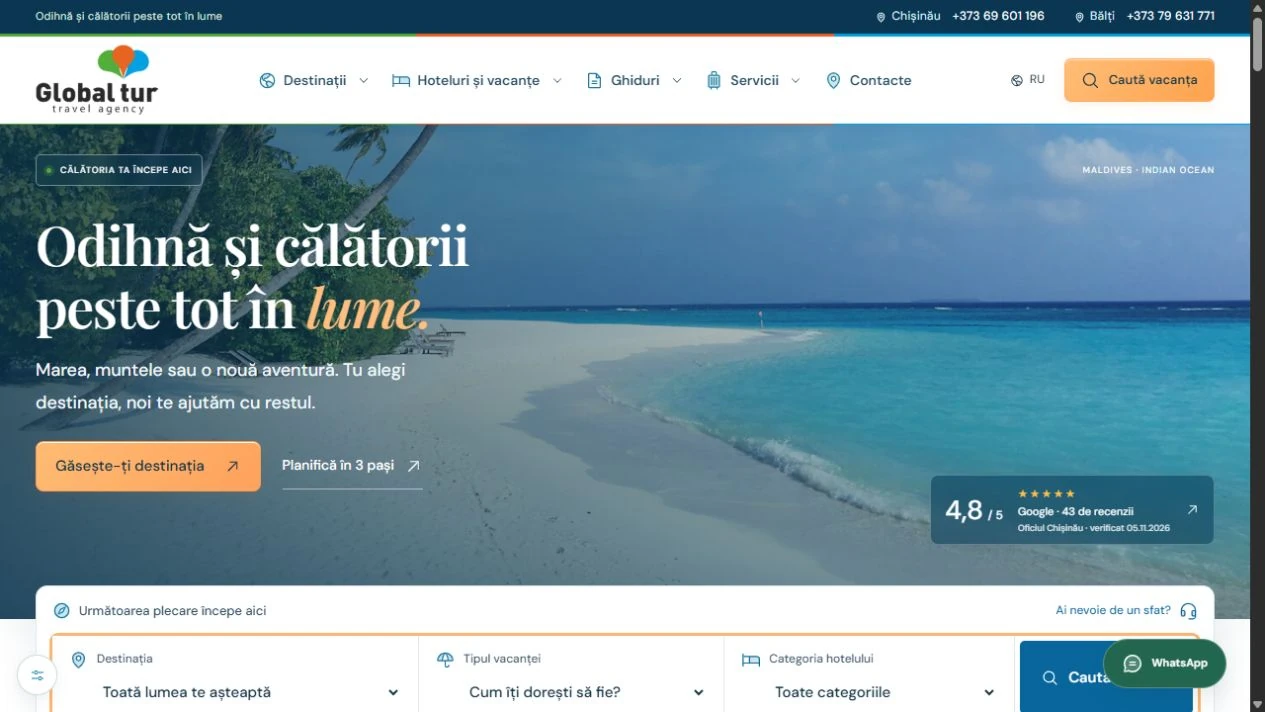
After redesign. A real capture from globaltur.md, the company’s main domain, 17 November 2026.
Open the screenshot at its original sizeThe new home page leads with travel photography, a short introduction and a holiday search. The menu brings together destinations, hotels, guides, services and contacts. Flights, insurance and transport remain easy to find because people visit the agency's site with specific questions about those services. On a small screen we left room to read and made the additional filters available when visitors need them.
Try a typical route through the site. Start on the home page and choose a seaside destination and a hotel category. Open a result, look at the photographs and start an enquiry from that hotel page. The agency receives the context for the property you chose. The consultant can then confirm availability, dates and the price. When a conversation begins with that detail, both the traveller and the consultant have a useful starting point.
I also looked at how the agency would keep the site up to date after launch. Staff can edit titles, offers, photographs and the contact information for both offices in the administration panel. They can update each language independently. Illustrative destination images are identified and kept separate from the hotel's own gallery. That gives visitors enough context to understand what they are looking at and gives the agency a way to maintain the catalogue as its work changes.
We put technical SEO into the new structure
We gave each important public page a preferred address. Canonical links point to the production domain, and hreflang connects equivalent Romanian and Russian pages. The XML sitemap lists pages eligible for indexing. The robots.txt file points to the sitemap and publishes the crawl rules. Filtered search results and administration screens have rules suited to their own purpose, alongside the public destination, hotel and service pages that readers should be able to find.
I also checked the experience of arriving directly from a search result. The heading, text and nearby links should explain the country, resort and category the visitor has landed in. We used structured data for the site, agency and breadcrumb trail and grounded it in the information people can see. For example, a resort page links to nearby hotels and remains useful even if the visitor has never seen the home page.
The launch report recorded checks on 1,220 canonical pages. For the addresses in that set we reviewed the HTTP response, main heading, preferred URL and indexing rules. Those checks documented the technical status at launch. Search Console provides a way to follow actual indexing and organic impressions as the site is crawled again. Global Tur sitemap
We optimized the first image visitors see
A large coastline photograph is one of the most noticeable parts of the redesign. It is also an obvious place to look when measuring loading performance. We prepared the hero in WebP at widths of 720, 1,440 and 2,400 pixels. The browser can choose a file that fits the screen. The hero image has a high loading priority, and the HTML dimensions help reserve space when the browser lays out the page.
Each choice serves a purpose. A suitable image size reduces how much has to be transferred. Declared dimensions help keep the layout steady. Loading priority helps the main visual appear earlier. On a travel site I also check what happens to the photographs further down, the search filters and the enquiry action. A visitor should be able to read and start using the page as it renders, especially when their connection is slow or they are already travelling.
We made the site installable as a web app
The published site includes a PWA manifest with the Global Tur name, icons and /rom as its start address. On a browser that supports installation, a visitor can add it to their home screen and open it in its own window. That is practical when someone returns to the catalogue several times while planning a trip, or wants to get back to the agency's contacts quickly.
We also checked what the service worker does. It can keep a limited set of public resources in the browser, including images and fonts. For page navigation it tries the network first. If the connection drops, it can display a purpose-built offline page. Sending an enquiry and working in the administration panel depend on a connection to the server. The published manifest shows the exact installation settings. Global Tur PWA manifest
We prepared public content for AI search and GEO
In this project I use GEO to describe preparation for search systems that synthesize answers from sources. We started with information that is useful to a traveller. Resort names need to be clear, the cities where the agency has offices should be easy to find, and services and photographs need context. The important public content is available in HTML. We connected related pages and made sure the menus and forms had clear labels.
That gives a system reading a public page a way to identify the language, place a hotel within a destination and find nearby information. Each platform decides which pages it retrieves and how it uses them. Google describes the technical and editorial foundations of ordinary search as the basis for its AI features too. My practical test is whether a page answers a real question with clear information a person can check. Google's documentation on AI features and websites
What the PageSpeed tests showed
Global Tur in PageSpeed Insights
Before → After
| Audit | Mobile | Desktop |
|---|---|---|
| Performance | Before 67, After 89 | Before 77, After 100 |
| Accessibility | Before 82, After 100 | Before 73, After 100 |
| Best practices | Before 69, After 100 | Before 69, After 100 |
| SEO | Before 58, After 100 | Before 58, After 100 |
| Agentic browsing | Before 1/2, After 2/2 | Before 0/2, After 2/2 |
Lab tests of vechi.globaltur.md and globaltur.md/rom. The archive uses a noindex directive, which can affect the SEO audit. Real-user data (CrUX) was unavailable. Agentic browsing counts the technical checks that passed.
View the case study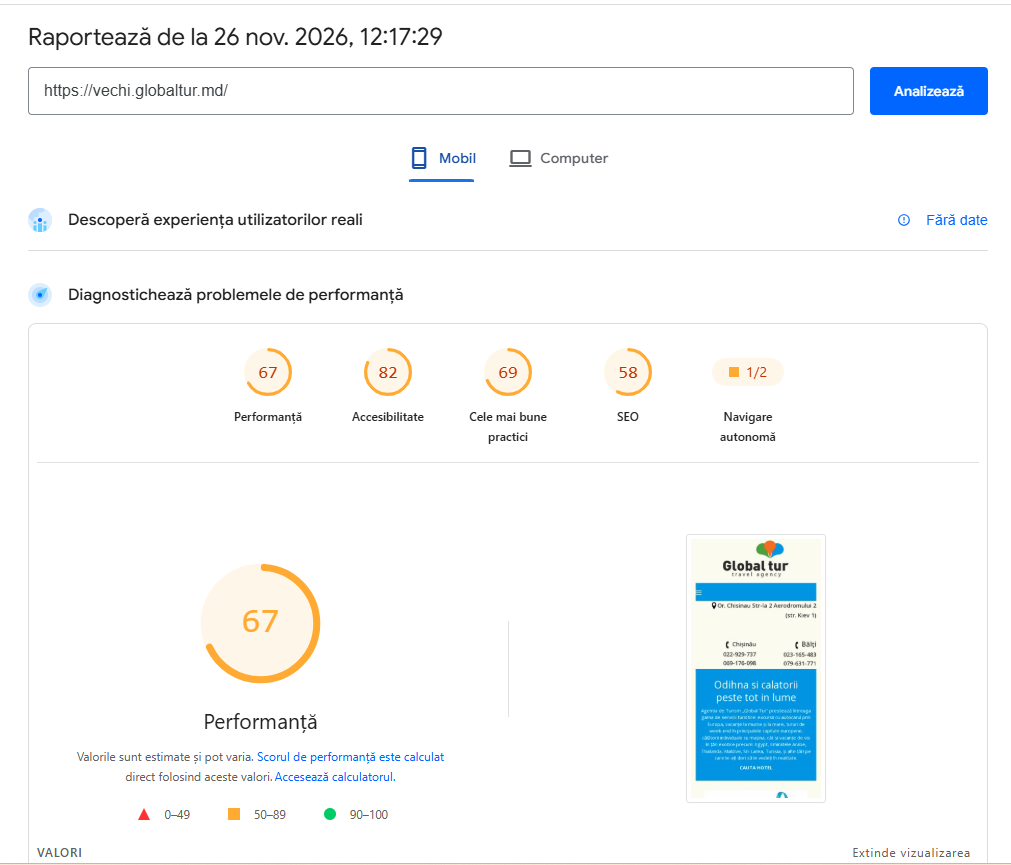
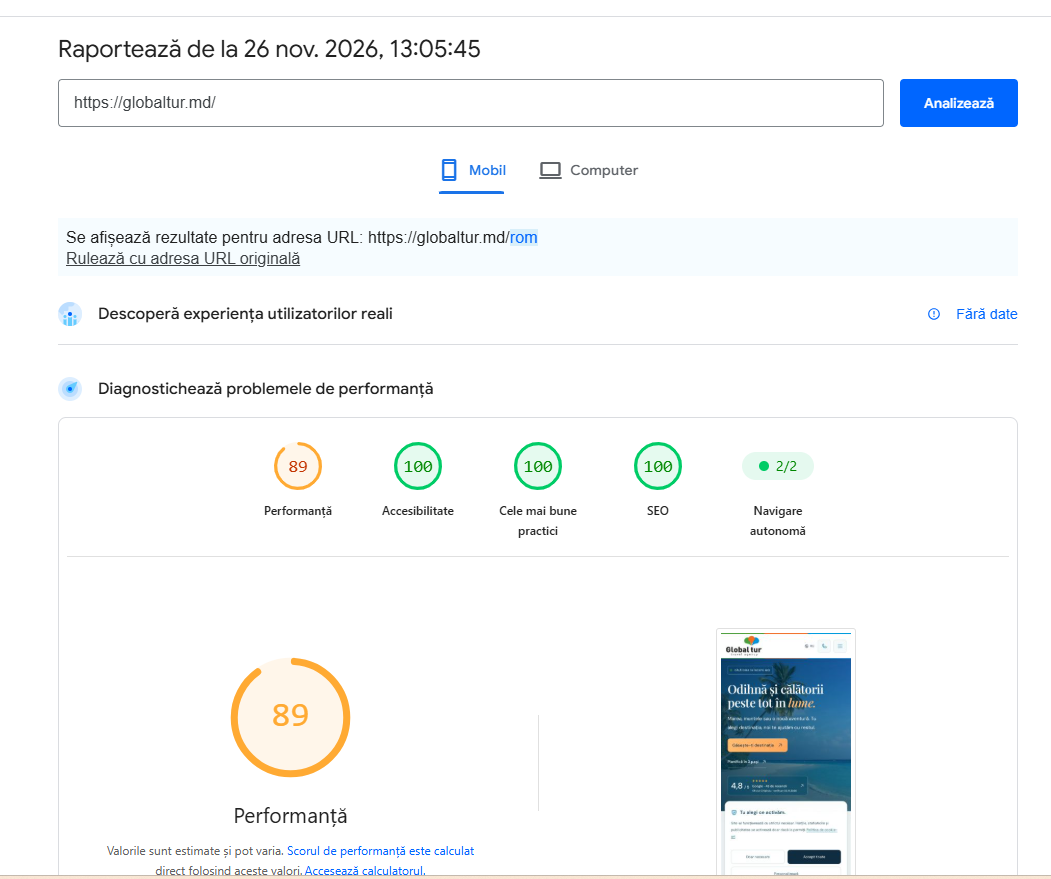
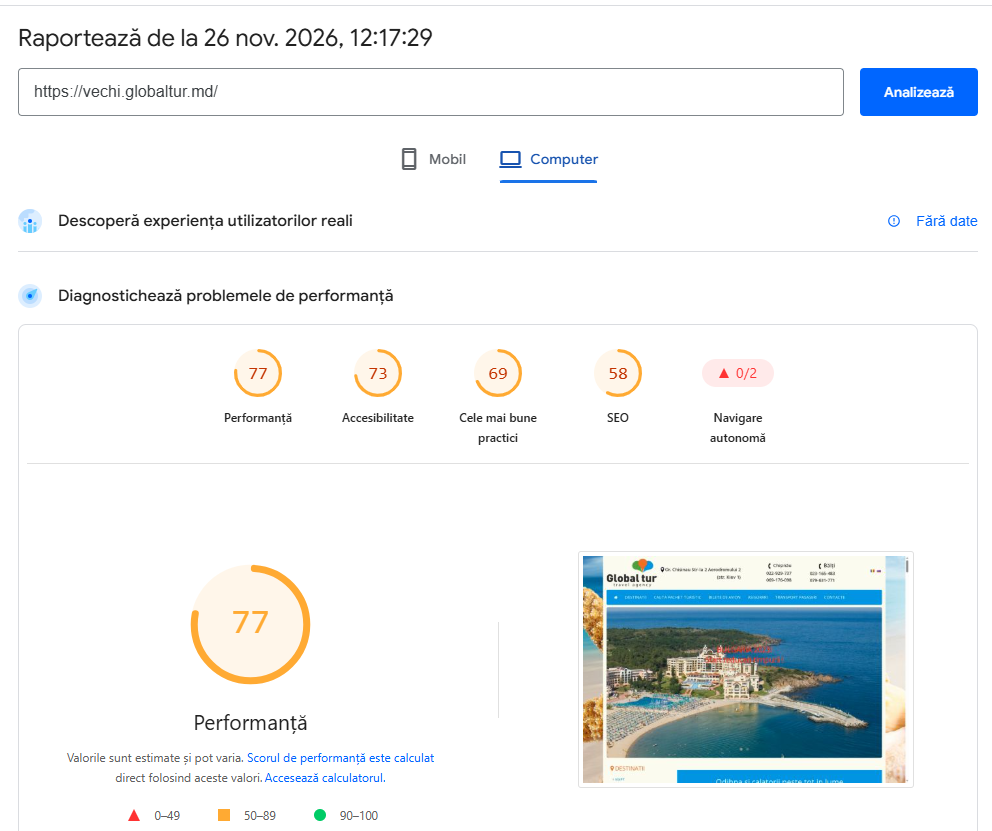
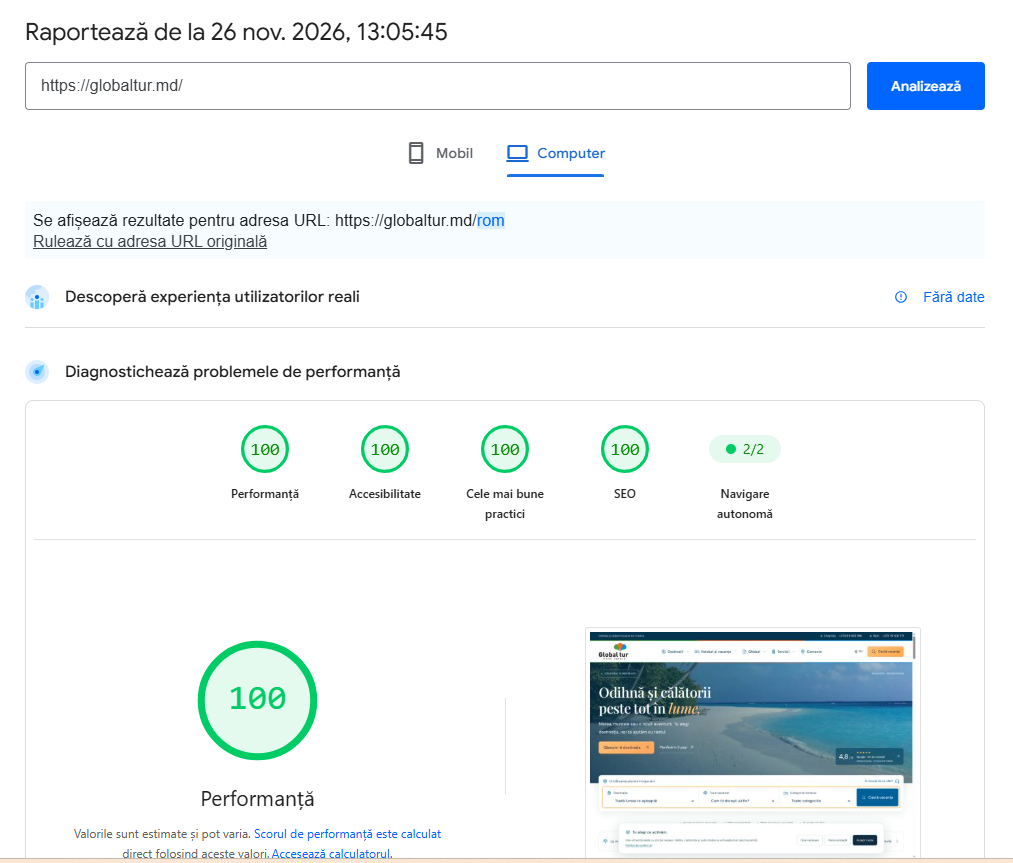
On 26 November 2026 we compared the archived home page with the published site. PageSpeed shows the new-domain results for /rom, where the main address leads. The four screenshots cover mobile and desktop for each version. They show the addresses, test modes and scores so the comparison can be read in context.
Mobile performance rose from 67 to 89, and desktop performance went from 77 to 100. The SEO audit moved from 58 to 100 on both devices, and accessibility and best practices reached 100. The archived site sends a noindex directive, which can affect its SEO audit score. The new reports show 2/2 for agentic browsing on mobile and desktop. That category counts the technical checks passed in the test run. Impressions and citations in AI answers are outcomes to measure separately with the data available from each platform. How Lighthouse scores agentic browsing
The real-user section showed no data in all four reports. These figures describe lab runs for the tested home pages. The experience people have can vary with the device, connection and contents of a page. A useful follow-up is to repeat the tests on a typical hotel listing and a destination page, then check real-user data when it becomes available. How PageSpeed Insights works
How I judge whether the redesign has done its job
After publishing I like to walk through the short journeys again. Open the site in Romanian and Russian. Follow a link directly to a hotel, switch languages and find the number for the relevant office. Check where a legacy address takes you and what happens when the web app loses its connection. These journeys show where the technical work affects the agency and its customers.
Then there are questions to answer with behaviour over time. Which pages appear in search? Which destinations bring in relevant visitors? Where do people start an enquiry, and does the consultant receive the context they need? The audit gives us a starting point for that work. For Global Tur we brought the catalogue, design, SEO, speed, installable website and preparation for AI-assisted navigation into one project. The case study has both versions so you can try those journeys yourself. Global Tur case study
Sources and documentation
Your notes
Notes stay in this browser.