IsoTherm Lux: services, a calculator and assessment enquiries
How the website connects insulation services, an indicative calculator and an assessment form. A practical guide to bilingual structure, evidence and enquiry handling.
Contents
IsoTherm Lux organises technical services into an accessible property-owner journey: understanding the work, obtaining an indicative estimate and requesting assessment. Its public structure includes thermal, water and acoustic insulation, a calculator, projects and guides in Romanian and Russian. This study examines those product decisions without attributing undocumented savings or sales to the website.
Three services provide three entry points
The IsoTherm Lux website separates insulation types in navigation. Owners can begin with their space's concern: temperature, water ingress or noise. Each service page can then introduce the method and assessment conditions, moving from broad interest towards a useful conversation.
For a similar website, describe relevant surfaces, suitable situations and discussion requirements on each page. Technical terminology helps when it explains a decision. Space use and access to the surface, for example, prepare an assessment better than a general quality claim.
Connect services that may be discussed together. Someone considering an attic may have questions about several interventions, and the page should indicate where to find further explanations. Each link has a concrete purpose related to the building and the owner's needs.
The calculator provides a starting point for discussion
The public calculator collects area and work-type information before displaying an indicative estimate. It turns a general pricing question into a starting point for assessment. The page maintains a distinction between the calculated amount and an exact quotation.
For implementation, define required inputs and how indicative prices are updated. Explain the area unit and conditions included in calculation. When a value is missing or impossible, provide a precise correction while preserving the other entries so the person can continue without starting again.
A hypothetical test can use the same area with two work types. Check that the label, formula and summary change together. Then try unusually small and large areas, assessing whether explanations remain clear and whether the result needs additional assessment context.
Carry the estimate into the assessment form
The project connects its calculator and form to a shared enquiry flow. This allows customers to continue from information already entered. Colleagues need the work context rather than an isolated phone number with no relationship to the preliminary estimate.
Separate work information from contact details. Location, space type and area support initial review; photographs can complement the explanation. Labels should distinguish what is needed now from what can be clarified during a conversation or site visit.
Confirmation explains receipt and the next stage. After saving, show enough of a summary for the customer to recognise the request. The team should find the related estimate and update status after contact, assessment and quotation while preserving changes to the original conditions.
Projects and guides answer different questions
Project pages show application contexts while guides develop explanations. Together they support service pages: photography helps visitors recognise a situation and text explains the process. Readers can move from an example to detail and then request assessment of their own space.
For each project, prepare approved photographs with intervention, stage and material context. For guides, begin with recurring enquiry questions. An article about preparing a space can help future customers and make conversations more specific before a visit is arranged.
Relate technical specifications to the actual product and working conditions. Check claims against manufacturer documents and measured outcomes against project records. This discipline preserves the distinction between a material property and the performance of a complete building.
Both languages need to describe the same offer
The website has two language versions, with consistency needed across services, calculations and confirmations. After switching languages, people should find the same work and conditions. Maintain a glossary for frequently used materials and stages so later updates remain coherent.
Test long copy and numerical controls on phones. A translated selector may need more room, and an omitted unit can change interpretation of the result. Use actual form and calculation examples in both languages, including incorrect values and missing required information.
Keep contact options beside useful context
Some visitors prefer a form while others want to talk before entering details. Phone and messaging provide alternative routes. Position contact after relevant explanations and keep it accessible on phones while leaving calculator controls and fields unobstructed.
In the CRM, link interactions to the appropriate enquiry when sufficient matching information exists. A call after a form may continue the same project. Contact clicks indicate intent; received enquiries and actual conversations are separate stages, each useful for understanding the customer journey.
Build local discovery and advertising around services
Distinct service pages provide relevant destinations for search and campaigns. An advertisement about a particular job can lead directly to its explanation and assessment route. Preserve language and offer consistency so visitors immediately recognise the message that attracted them.
Keep business names, contact details and actual service areas current in company profiles. Google Business Profile guidelines explain business and location representation. Define suitable campaign enquiries around area, service and reachable contact rather than promising fixed rankings or volumes.
PageSpeed Insights: 100 on desktop
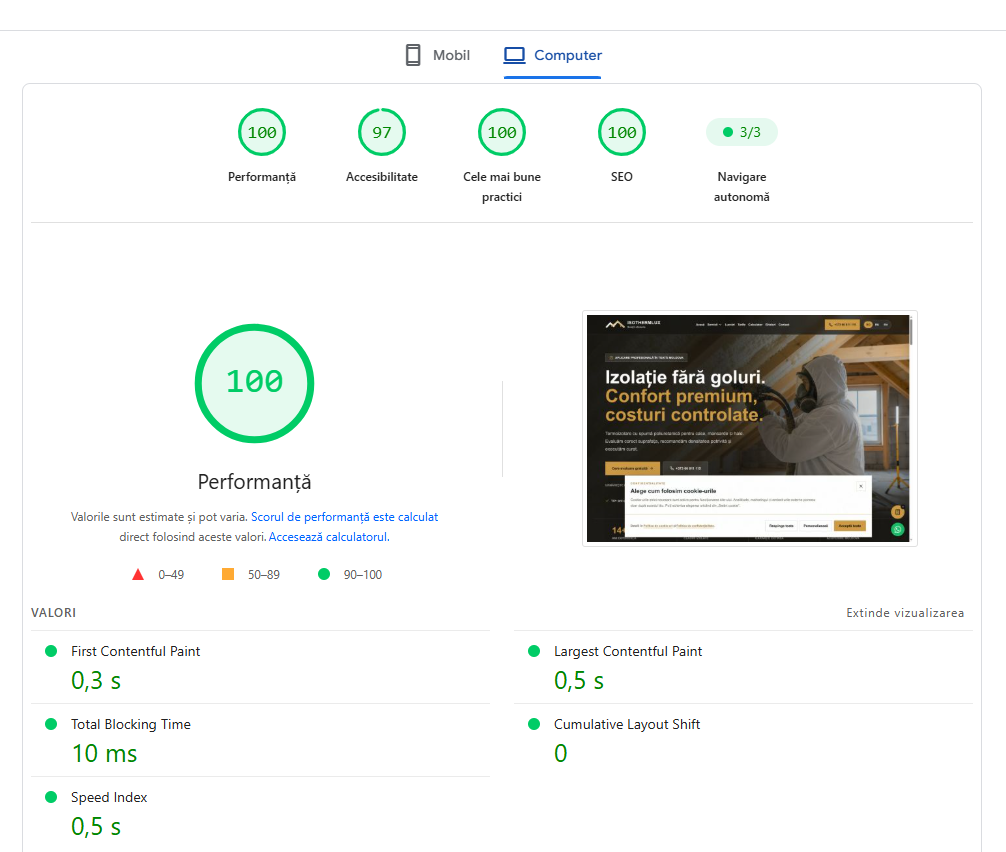
Desktop · performance 100/100, accessibility 97/100, best practices and SEO 100/100. FCP 0.3 s, LCP 0.5 s, TBT 10 ms, CLS 0 and Speed Index 0.5 s. Screenshot supplied for the project and added on 26 September 2026; values refer to the test shown.
Open the screenshot at its original sizeUpdated on 26 September 2026. We are adding two supplied PageSpeed Insights screenshots to the IsoThermLux project presentation. The desktop test shows performance 100/100, accessibility 97/100, best practices 100/100 and SEO 100/100. First content appears at 0.3 seconds and the largest content element at 0.5 seconds. Total Blocking Time is 10 ms, while CLS 0 indicates visual stability in this run.
For a service website, fast loading helps visitors reach insulation information, the calculator and the assessment enquiry. The report adds technical measurements to the project presentation. Google’s PageSpeed Insights documentation explains how lab tests complement real-user data.
PageSpeed Insights: 96 on mobile
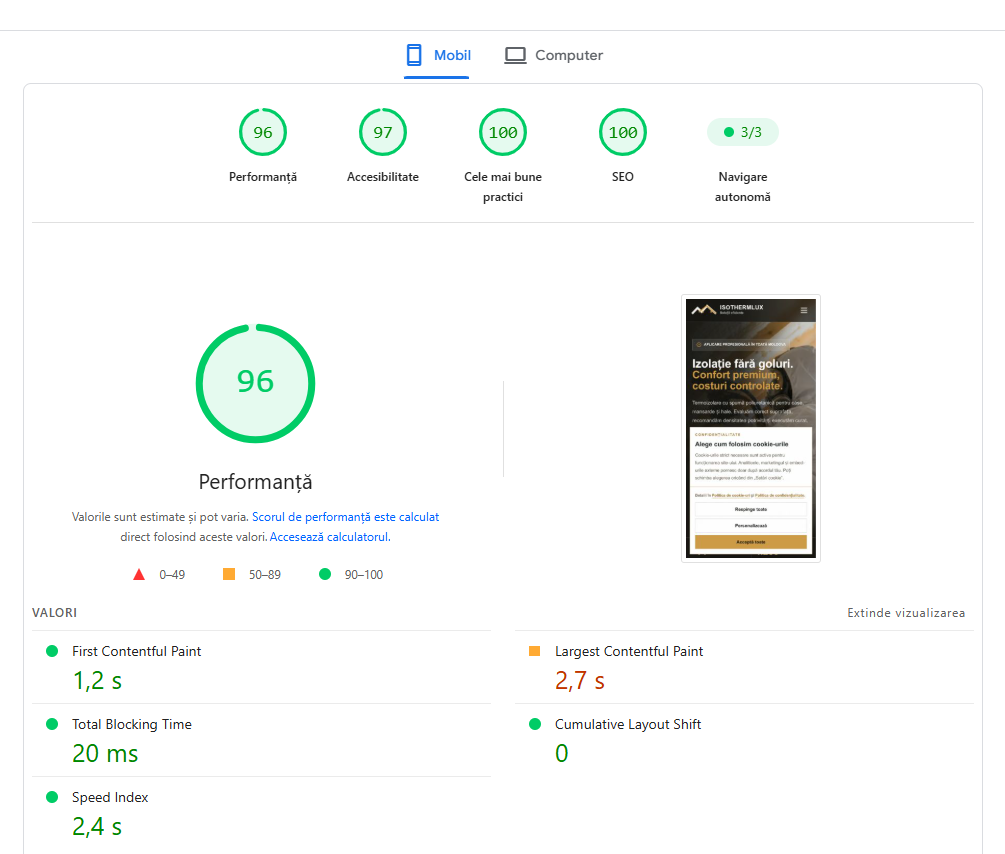
Mobile · performance 96/100, accessibility 97/100, best practices and SEO 100/100. FCP 1.2 s, LCP 2.7 s, TBT 20 ms, CLS 0 and Speed Index 2.4 s. Screenshot supplied for the project and added on 26 September 2026; values refer to the test shown.
Open the screenshot at its original sizeThe mobile test shows performance 96/100, accessibility 97/100 and 100/100 each for best practices and SEO. FCP is 1.2 seconds, LCP 2.7 seconds, Total Blocking Time 20 ms and CLS remains 0. Speed Index is 2.4 seconds. These results document stable loading in the test shown and provide specific reference points for subsequent mobile checks.
We publish both full screenshots because desktop and mobile tests use different conditions. Scores may vary between runs; they are not Google rankings and do not independently establish a real-user Core Web Vitals pass. The website is live and development continues. The implementation and reports also appear in the IsoThermLux case study.
Check the journey from browser to colleague
Test service selection, calculation, submission and the team's operational record. Include connection failure and repeated submission. Visitors should receive accurate messages while colleagues receive context and a next action, allowing technical submission success to become actual handling.
Nonessential tracking requires consent, with refusal respected without blocking an enquiry. Reporting can distinguish calculator use, received requests and assessments that progressed. Verification connects design with operation: every stage has a clear meaning and someone responsible for continuing it.
Sources and documentation
Your notes
Notes stay in this browser.